

In the milliseconds that separate champions from contenders, the difference isn’t just skill—it’s your software stack. Think of your hardware as the muscle, but your software is the nervous system. It’s the difference between reacting and anticipating, between a good play and a legendary one.
Modern competitive play isn’t just about raw talent. It’s a symphony of split-second decisions. A single frame drop or a micro-stutter can rewrite the entire match. Your gaming rig is your avatar in the arena, but the software you run is the ghost in the machine, the silent co-pilot.
We’re not just talking about hitting a higher frame rate. We’re talking about the unfair advantage. The kind of advantage that turns a 50/50 duel into a 70/30. It’s the difference between seeing the flicker of an enemy in your peripheral vision a frame earlier, or your controller responding with the immediacy of a synapse firing.
This isn’t about gaming with a few utilities in the background. This is about building a lean, purpose-built toolkit that eliminates excuses. It’s about knowing your hardware’s every breath and whisper. Let’s stop blaming the lag and start engineering our own edge.
Categories of gaming tools explained
Think of your gaming rig as a Formula 1 car. The hardware is the engine and chassis. But the gaming performance tools are like the telemetry, diagnostics, and crew chief all in one. They make a big difference in your gaming experience.
It’s not just about more frames. It’s about stability, control, and getting rid of any problem that might stop you from winning. Let’s look at the essential software that makes a big difference.
Performance and System Optimization
This is the command center for your PC’s vital signs. It’s not just about seeing numbers; it’s about understanding what they mean and taking control. Forget the “set it and forget it” mentality. The modern gamer needs to be a part-time systems analyst.
The Monitoring and Tuning Suite
Tools like MSI Afterburner and HWiNFO are your diagnostic dashboards. They help you go from guessing to knowing. You’re not just seeing your GPU temperature; you’re seeing the precise moment a CPU core throttles, causing that micro-stutter in your aim.
This is the data you need to make gaming performance tools work for you. It’s the difference between feeling a game is “sluggish” and knowing your GPU is hitting its power limit. You can’t fix what you can’t measure. These tools let you measure everything.
Consider the essential toolkit for any serious PC. This table breaks down the core diagnostics:
| Tool Category | Primary Function | Key Benefit for Gamers |
|---|---|---|
| Hardware Monitoring (HWMonitor, HWiNFO) | Real-time tracking of CPU/GPU temp, voltage, and clock speeds. | Prevents thermal throttling, the silent FPS killer. |
| In-Game Overlays (MSI Afterburner, RivaTuner) | Displays FPS, temps, and frame times on-screen. | Real-time performance data without alt-tabbing. |
| Overclocking/Undervolting (MSI Afterburner, ThrottleStop) | Fine-tunes GPU/CPU voltage and clock speeds. | Extracts maximum stable performance from hardware. |
Graphics, Input, and Multimedia
This suite is all about refining the experience. It’s the difference between seeing the game and being in it. It handles what you see and how you interact with the world. This is where the competitive esports gear meets the software that makes it sing.
The Immersion and Output Suite
This isn’t just about cranking settings to “Ultra.” It’s about intelligent optimization. Tools like NVIDIA GeForce Experience or AMD Adrenalin optimize game settings for your specific hardware. But the magic goes deeper. Input mappers like DS4Windows break down platform barriers, letting you use any controller.
And for the creators and streamers, software like OBS Studio and Voicemeeter are non-negotiable. They transform your raw gameplay into a polished, broadcast-ready show.
System and Network Utilities
This is the unglamorous, essential pit crew. While everyone focuses on the best gear for esports pros, the software that keeps the system itself running smoothly is often overlooked. This is the maintenance and logistics crew.
The Essential Maintenance and Network Toolbox
This category is about stability and a clean foundation. It includes the digital janitors and network engineers. Tools like Display Driver Uninstaller (DDU) ensure a clean slate for new GPU drivers, preventing countless hours of troubleshooting. Library managers like GOG Galaxy 2.0 fight the “launcher-pocalypse.”
Network tools are your first line of defense against lag. A tool like PingPlotter can tell you if that spike was your internet or the game server, saving you from a pointless router reset. These aren’t glamorous tools, but they maintain the rock-solid, low-latency environment where gaming performance tools prove their worth. They ensure the race car isn’t just fast, but also reliable.
Ultimately, the right gaming performance tools transform your setup from a collection of parts into a cohesive, high-performance system. It’s the difference between playing the game and mastering the machine that plays it.
Hardware vs software advantages
In the world of gaming and content creation, there’s a battle for the best performance. This fight is between the physical parts of a computer and the smart code that runs it. It’s not a simple battle of hardware versus software. Instead, it’s a conversation between the two.
Understanding this conversation is key to unlocking your computer’s full power.

The Hardware Advantage: Pushing the Physical Limits
Let’s talk about raw power. The parts of your PC, like the CPU, GPU, and RAM, are the physical workers. But without smart code, they’re just expensive parts.
The real power comes from the software that pushes these parts to their limits.
The Raw Power of Silicon and Silicon’s Minions
Tools like MSI Afterburner and HWMonitor are your digital helpers. They talk to your hardware and help you get the most out of it. Want to make your GPU run faster? These tools help you do that.
Adjusting fan settings to keep your PC cool is more than just about noise. It’s about working with your PC’s temperature limits.
This is the hardware advantage: direct, low-level control. These tools let you monitor and adjust your PC’s performance in real-time. They help you push your PC to its limits, but safely.
The Software Supremacy: Where Frames Meet Intelligence
But raw power alone isn’t enough. If hardware is the muscle, software is the brain. The real “software advantage” is about using the right code and avoiding the wrong one.
The Bloatware Problem and the Lean Tool
Official software from brands like Corsair and Razer can be a problem. It’s often big, buggy, and resource-hungry. These suites can take up a lot of space and slow down your PC.
The real software advantage is in using lean, efficient tools. These tools do one job well without slowing down your PC. This is the critical difference in hardware vs. software.
The next time your PC feels slow, check your system tray. Often, the problem is a service from an old peripheral. Uninstalling these services can make your PC faster. The real software advantage is in choosing smart, efficient tools over big, bloated ones.
Pro usage examples
While gamers use a monitor and mouse, pros have a whole set of specialized tools. Each tool is fine-tuned for perfect performance. The difference between a rough amateur stream and a smooth pro stream is not just talent. It’s about choosing the right tools.
Forget general software suites. Pros use specific tools for each task. They have a set of tools that work together perfectly.
This shows how theory meets reality in live broadcasts. Let’s look at a pro’s digital tools.
The Streamer’s Setup
Imagine a control room in a major network, but on a single monitor. At its core is OBS Studio, the top free broadcasting software. It’s the base for everything.
But the real magic is in the layers. There’s a game capture, a facecam feed, and a performance overlay. All these work together in OBS. It’s not just a game; it’s a full production.
Now, listen to the audio. It’s not just one feed. Voicemeeter Banana splits the audio into different channels. This way, the game sounds, team chat, and streamer’s voice are all clear.
This control makes the audio sharp and clear, like a studio. It’s what makes a stream sound professional.
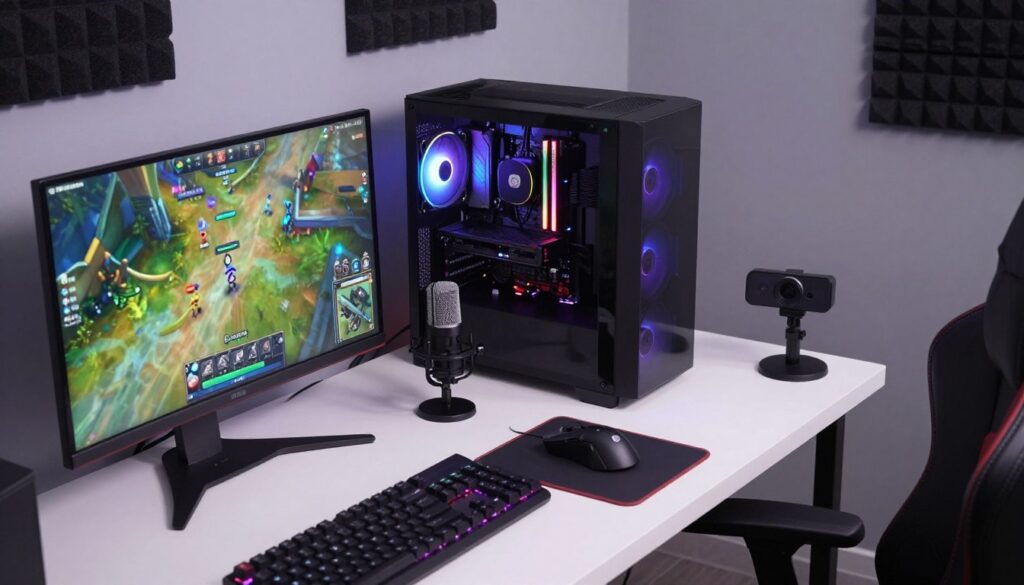
Here, specialization really shines. OBS handles the visuals, and Voicemeeter the audio. MSI Afterburner shows the PC’s performance in real-time. It shows FPS, CPU/GPU load, and temperatures.
This isn’t just for show. It’s real-time diagnostics. The streamer and audience see the performance impact of every action.
But the pro’s secret is what they don’t run. They avoid software that takes up resources. They use onboard memory for settings, not big software suites.
This focus on efficiency means every resource is used for the game and stream. It’s all about being lean and purposeful.
Quality equipment is key for pros. The importance of quality esports equipment is well-known. It ensures the software stack runs smoothly.
So, when you see a flawless stream, you’re seeing more than talent. You’re seeing the result of a carefully chosen set of tools. It’s a symphony of tools, each playing its part perfectly.
How to choose tools for your game
Building your ultimate setup isn’t about collecting every utility. It’s about choosing the right tools that give you clarity and control. Don’t let your system slow down. Your toolkit should be precise, not overwhelming.
The Selection Criteria: A Practical Guide
Forget the hype. The pro’s edge isn’t a secret cheat code; it’s a method. Start by auditing your tools. Do you really need that RGB lighting suite or mouse driver running 24/7?
Often, the cleanest performance comes from setting a hardware profile and removing the manufacturer’s bloated software entirely. Next, focus on the in-game settings menu. It’s the most powerful “tool” you have, giving you big visual-to-performance gains for free.
Test like a scientist. Change one variable at a time—a single graphics setting, a single background process. If your frames jump, you’ve found your culprit. This isn’t guesswork; it’s a controlled experiment.
Building Your Own Toolkit
Start lean. Your core software arsenal should be a minimalist’s dream. For monitoring, a tool like MSI Afterburner with RivaTuner provides essential, real-time data without clutter.
For capturing your greatest plays, Open Broadcaster Software (OBS) is the pro standard for a reason. And for a clean, unified game library, consider a universal launcher. This isn’t about having every tool. It’s about having the right esports software: MSI Afterburner for monitoring, OBS for capture, and a lightweight launcher.
This lean approach gives you clarity, control, and the competitive edge without the system-crippling bloat.